When a Product Leader Goes Back to Building: Reviving 5-Year-Old SaaS With AI


Parental leave has a funny way of slowing life down in the best possible way. Between diaper changes, late-night feeds, and short naps, I found myself with something I hadn’t had in years: quiet pockets of uninterrupted thinking time.
One weekend, almost on a whim, I opened an old Git repository.
Inside it was an online election SaaS platform I had built during the COVID lockdowns in 2020. Back then, it solved a very real problem. Teams needed a secure way to run elections remotely. I built it fast, launched it, and real organizations actually used it.
And then… life happened.
Bigger roles. Larger platforms. More responsibility. The product stayed online — but untouched for almost five years.
Looking at it again in 2025 felt like opening a time capsule.
It worked.
But it looked old.
And it felt like it belonged to a different era of SaaS.
That’s when I had a simple thought:
What would happen if I tried to modernize this product today using the AI tools we now talk about every day?
This wasn’t about reviving a business. It was a personal experiment in modern product execution.
Why I Even Bothered Touching a “Dead” Project
From a pure business perspective, this product wasn’t a priority.
- No major revenue
- No team
- No roadmap
- No urgency
But as a product leader and builder, it was the perfect sandbox. The mission still mattered — secure, simple online elections — but the experience had clear cracks:
- Dated UI
- Dashboards showing data, not insight
- Overwhelming setup flow
- Poor mobile experience
- Legacy PHP stack
For most of my career, the hardest part hasn’t been deciding what to build.
It’s always been how fast you can execute without breaking things.
So I treated this like a real modernization effort.
Just me — and a few powerful AI tools.
Starting from the User’s Point of View
Before touching a single line of code, I used the platform as a brand-new customer.
That exercise was humbling.
As a builder, I knew every edge case.
As a user, I felt every ounce of friction.
A few things stood out immediately:
- The dashboard showed numbers, but didn’t answer: What should I care about right now?
- Ballot setup felt like filling out a tax form — too many fields, not enough guidance.
- On mobile, buttons were cramped, tables too wide, actions buried.
- The UI wasn’t broken — it was just… uninviting.
Suddenly this wasn’t just a side project anymore. It was a real product problem again.
My goals became clear:
- Reduce cognitive load
- Increase confidence during setup
- Make mobile feel intentional
- Keep everything backward-compatible and safe
Modernizing the UX — One Real Improvement at a Time
Instead of a full redesign, I took a pragmatic approach: fix the biggest friction point, validate, repeat.
This is where modern “vibe coding” tools genuinely surprised me. But I never treated AI as an autopilot. I treated it like a junior designer and frontend developer:
- I explained what the screen was supposed to do
- I shared what felt broken
- I asked for improvement ideas — not code yet
- I picked the most impactful change
- Then I asked for implementation
For every single change:
- The tool updated the view, controller, and JavaScript
- I reviewed every diff manually
- Tested each flow myself
- Rolled back anything that didn’t feel right
Nothing was blindly accepted.
Some of the most impactful improvements:
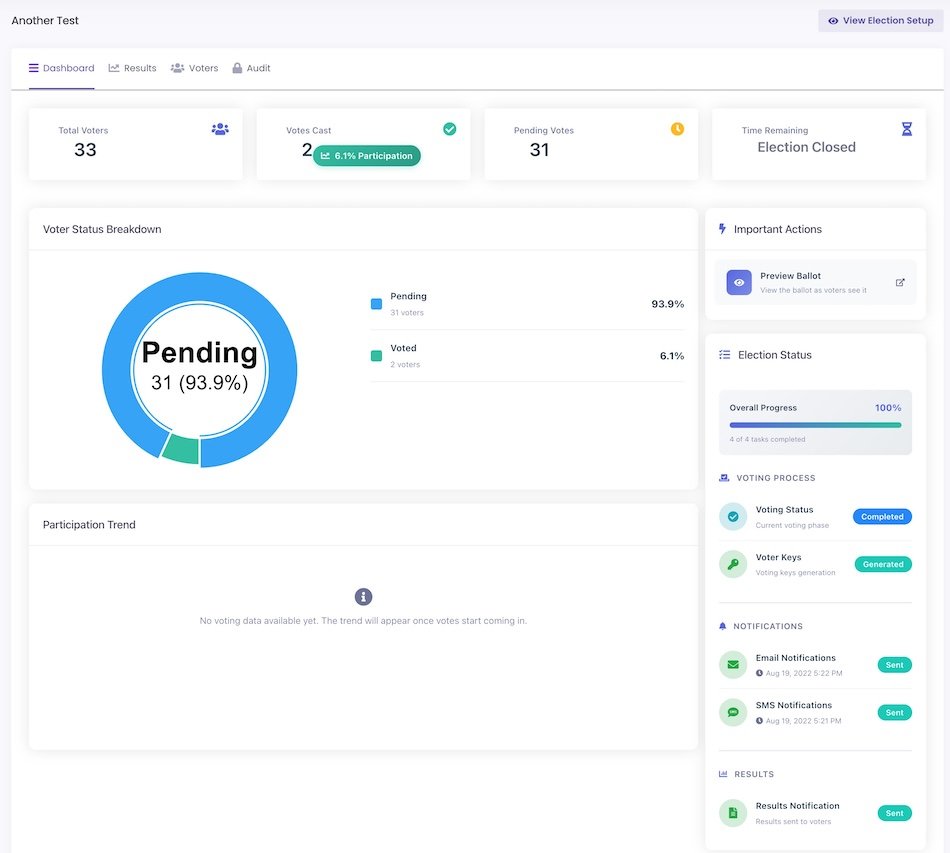
- Summary cards for active, pending, and completed elections
- Color-coded status badges with icons
- Clear, helpful empty states
- Action buttons that actually looked like actions
- Mobile views that finally worked
- Improved spacing, typography, and visual hierarchy
I didn’t ship perfection.
I shipped progress.
In about 2–3 hours, the product felt like it belonged in 2025 again. That speed still feels unreal. Here’s how it looks now; it feels better, maybe it could be better, but it’s good for now.
Product Management in Practice (Without a Framework Slide)
I didn’t use a formal prioritization model in this sprint. But instinctively, I applied a simple filter:
High user pain × Low effort = Ship immediately.
If a change removed a major friction point and could be shipped in under an hour, it made the cut. This prevented me from over-engineering and kept momentum high.
Technical Mini-Deep Dive: Upgrading the Backend
Upgrading the backend was the part I feared most. The app was running on an ancient PHP version. I expected breakages everywhere — and I wasn’t wrong.
Several legacy libraries failed immediately on first deploy. Instead of brute-forcing fixes, I:
- Used static analysis to map dependencies
- Isolated upgrades module by module
- Validated each fix before merging
The result:
- Better performance
- Improved security
- Dramatically easier future maintenance
Not glamorous — but foundational. Help from the AI tool was immense in making all these changes.
The Real Problem Wasn’t UX — It Was Confidence
Even after the visual cleanup, one thing remained clear:
Ballot setup was where users still hesitated most.
This wasn’t a design issue anymore. It was a confidence issue.
Users didn’t know:
- Which settings mattered
- How to translate governance rules into configuration
- Whether they were “doing it right”
So I decided to use Generative AI not as a shiny feature — but as a confidence layer.
Building “Create Ballot With AI”
I integrated the ChatGPT API into the setup flow and added a button: “Create Ballot With AI.”
Users now simply describe, in their own words:
- What kind of election this is
- What voters are choosing
- Any rules or constraints
- Instructions for voters
Under the hood:
- Structured prompts
- Machine-readable output formats
- Validation logic
- Cost guardrails
- Ingestion pipelines for AI output
The initial build took under 30 minutes.
The real work was in testing.
I created over 150 ballots manually using:
- Messy prompts
- Contradictory rules
- Odd election types
- Edge-case scenarios
It held up.
What used to be the hardest part of the product became the easiest.
That was the moment when AI shifted from experiment → core product primitive.
When AI Got It Wrong
Not every AI suggestion was a win.
At one point, it proposed a color palette that completely clashed with brand identity and made status indicators harder to scan. I rolled that change back immediately.
That moment reinforced something important:
AI is a powerful partner — not a replacement for product judgment.
Speed Didn’t Replace Discipline
Despite the speed, I didn’t let engineering hygiene slip:
- Every change reviewed for long-term maintainability
- Tested across browsers and devices
- Validated against existing workflows
- Deployed in small, reversible batches
Speed didn’t replace discipline. It simply compressed it.
🛠 Technical Stack at a Glance
- Backend: Legacy PHP 5.6 → PHP 8.x
- Database: MySQL
- Architecture: MVC
- Frontend: HTML, CSS, JavaScript
- AI Integration: ChatGPT API
- Version Control: Git
- Deployment: Incremental local → prod releases
- Testing: Manual regression and cross-device validation
Why this matters for leaders:
This transformation happened inside an existing legacy system — not a greenfield rebuild.
📊 Results Snapshot (Less Than 24 Hours)
✅ Fully modernized core user flows
✅ Mobile usability restored
✅ AI-powered ballot creation shipped to prod
✅ Backend upgraded to latest PHP
✅ 150+ AI test ballots executed
✅ Onboarding friction dramatically reduced
✅ Zero critical post-deployment regressions
What typically takes weeks of coordinated delivery happened in a single focused day.
What I’d Do Differently Next Time
Two things:
- I’d automate regression testing earlier. Manual QA worked for a solo sprint, but deeper automated coverage would have caught a few subtle bugs sooner.
- I’d pull in one or two real users earlier for fast qualitative validation.
The Leadership Lesson That Hit Me the Hardest
After 15+ years in tech, one constraint has never changed:
Execution capacity.
- More ideas than time.
- More opportunities than bandwidth.
- More requests than dev cycles.
- Hiring helps — but slowly. Onboarding temporarily reduces velocity before it improves it.
This experiment made something very clear:
With the right AI leverage, a small, focused team can execute like a much larger one — not recklessly, not sloppily, but faster, with tighter feedback loops.
As a product leader, this changes everything:
- Prototype faster
- Test with less sunk cost
- Kill bad ideas sooner
- Double down on good ones immediately
This is why I genuinely believe the next wave of serious companies will be built by small, highly leveraged teams.
What’s Next for This Product?
This won’t become my full-time business. But it’s now a living product lab for:
- AI agents for lead qualification
- Automated onboarding
- Smart marketing workflows
- Sales enablement copilots
AI will operate at machine speed.
I’ll decide what’s worth building next.
Final Personal Reflection
This wasn’t just a technical experiment.
It reconnected me with something I hadn’t felt in a long time:
The joy of seeing an idea go from thought → working feature → real user value in a single day.
We’re entering an era where:
- Strategy still needs humans
- Judgment still needs experience
- Execution no longer needs to be slow
Not because AI replaces builders — but because it magnifies what good builders and product leaders already do well.
And that is the most exciting shift of this entire AI era.